

Laboratory Test Management and Results Reporting Software for Clinics
Laboratory test management software for clinics is becoming essential for clinics, hospitals, laboratories, pharmacies, and healthcare centers that want to organize daily operations without relying solely on paper records, WhatsApp messages, or scattered spreadsheets.
In fact, Prosoft Africa helps clinic owners, hospital administrators, doctors, nurses, receptionists, cashiers, pharmacists, and laboratory teams use digital tools to improve record management, reporting, and accountability across Cameroon and Africa.
Laboratory teams also need traceable workflows that manage every step, from test requests to validated results. As a result, they can maintain accurate records, reduce administrative delays, and improve patient care.
This article explains how laboratory test management software for clinics fits into a complete hospital management software strategy. In addition, it explores practical implementation, staff adoption, reporting, system setup, and ongoing support. Therefore, decision-makers can better understand what to consider before selecting the right software solution.
Discover our Hospital Management Software and streamline laboratory operations, patient records, billing, and reporting with our laboratory test management software for clinics.
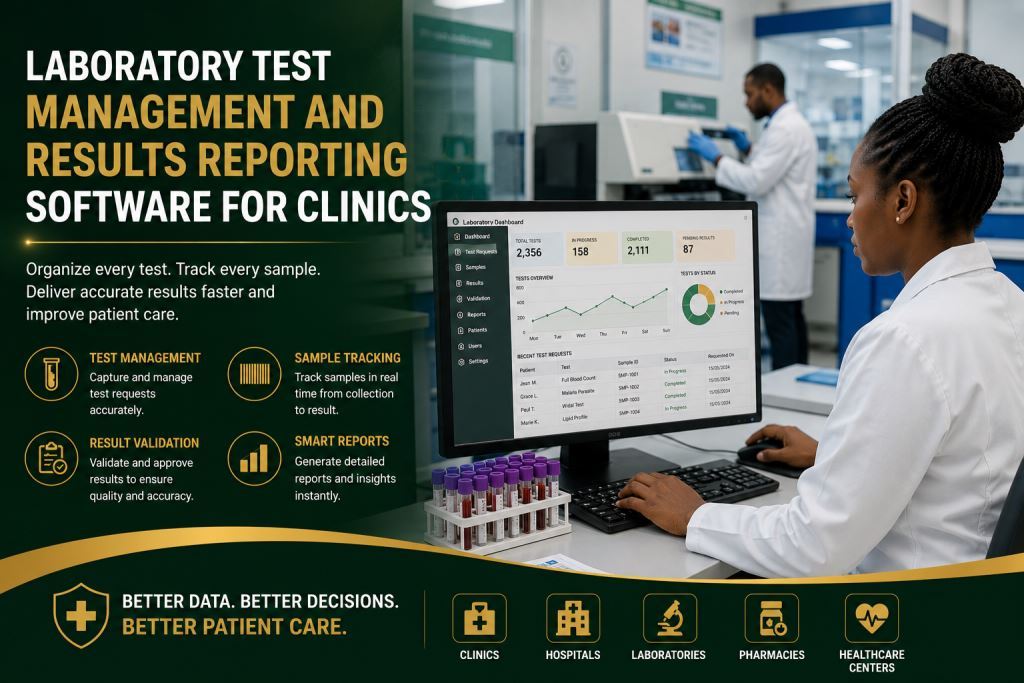
Why Laboratory Test Management Software for Clinics Matters for Daily Operations
The problem usually begins when healthcare facilities manage patient registration, appointments, consultations, billing, pharmacy services, laboratory results, staff access, and reports through different notebooks, mobile phones, spreadsheets, or verbal instructions.
Healthcare facilities may continue operating every day. However, it quickly becomes difficult to identify the latest patient record. Managers may also struggle to determine who entered the information or whether the available data is accurate and up to date.
Several warning signs appear over time. For example, clinics may lose patient files, experience long reception queues, produce unclear invoices, or discover pharmacy stock discrepancies. At first, these issues may seem minor. However, they become expensive as the organization grows, staff members change roles, or managers require reliable information to make important decisions.
A digital system should reduce confusion without making staff feel overwhelmed. It should not replace professional judgment or local experience. Instead, it should provide a shared workflow for daily operations. As a result, owners and managers gain a reliable overview of everything happening within the healthcare facility.
Across Cameroon and Africa, many healthcare organizations employ staff with different levels of computer experience. Therefore, a good platform should provide a simple interface, clear workflows, user permissions, practical training, and continuous support that matches the team’s pace.
Key Features to Look For
1. Test Request Records
This feature should be easy for authorized staff to use during normal daily operations. It should not be limited to end-of-month reporting.
In practical terms, Test Request Records allow healthcare facilities to capture patient information correctly the first time. The software stores every record securely and makes it available whenever managers, accountants, supervisors, or laboratory personnel need it.
Furthermore, clinics, hospitals, laboratories, pharmacies, and healthcare centers across Cameroon and Africa reduce repetitive data entry by using this feature. They also improve the accuracy of daily follow-up activities.
When healthcare facilities configure laboratory test management software for clinics correctly, staff spend less time searching for records. Consequently, they spend more time serving patients, supporting reception teams, assisting doctors and nurses, and improving laboratory efficiency.
Laboratory test requests become even more efficient when they automatically connect with the hospital billing process. Read our article Clinic Laboratory-To-Billing Workflow Software For Faster Administration to discover how integrated laboratory requests, automated billing and seamless administrative workflows eliminate duplicate work, reduce delays and improve service delivery.
2. Sample Status Tracking
Sample Status Tracking should remain simple for authorized users throughout normal daily operations. Staff should use it continuously instead of relying on it only during monthly reporting.
In addition, this feature allows healthcare facilities to monitor every laboratory sample from collection to result validation. Managers, supervisors, and laboratory personnel can check the status of any sample at any time.
Clinics, hospitals, laboratories, pharmacies, and healthcare centers benefit from faster follow-up and fewer tracking errors. As a result, laboratory teams improve efficiency, strengthen accountability, and reduce unnecessary delays.
When organizations successfully implement laboratory test management software for clinics, Sample Status Tracking helps staff locate information quickly. Therefore, they deliver laboratory services faster and improve the overall patient experience.
3. Result Entry
This feature should be simple for authorized staff to use during daily operations. It should not be limited to end-of-month reporting.
In practical terms, Result Entry enables laboratory teams to record test results accurately the first time. The software stores every result in the correct patient record and makes it available whenever a doctor, manager, or supervisor needs it.
Furthermore, clinics, hospitals, laboratories, pharmacies, and healthcare centers across Cameroon and Africa reduce repetitive work by using this feature. They also improve the accuracy of laboratory reporting and daily follow-up.
When healthcare facilities configure laboratory test management software for clinics correctly, laboratory staff spend less time searching for records. As a result, they devote more time to delivering accurate and timely test results for patients.
4. Result Validation
Result Validation plays a vital role in maintaining the quality and reliability of laboratory services.
In addition, authorized laboratory personnel can review and approve test results before releasing them to doctors or patients. This process reduces errors and increases confidence in every laboratory report.
Healthcare facilities also strengthen accountability because supervisors can verify every validated result. Therefore, clinics and hospitals improve patient care while maintaining accurate and reliable records.
When organizations implement laboratory test management software for clinics, Result Validation supports efficient workflows and improves communication between laboratory teams and healthcare professionals.
5. Patient Result History
Patient Result History enables healthcare providers to review previous laboratory results whenever necessary.
For example, doctors can compare current and previous results to monitor a patient’s progress. Laboratory teams can also retrieve historical records within seconds instead of searching through paper files.
Moreover, clinics, hospitals, laboratories, pharmacies, and healthcare centers improve continuity of care by storing all laboratory records securely in one centralized system.
When organizations use laboratory test management software for clinics, staff access patient histories quickly and efficiently. Consequently, they save valuable time and provide better clinical support.
Laboratory histories become significantly more valuable when they are integrated into a complete electronic medical record. Explore our article Electronic Medical Records Africa For Clinics And Hospitals to learn how centralized medical records combine laboratory results, consultations, prescriptions and clinical histories into one secure patient file, helping healthcare professionals make faster and better-informed clinical decisions.
6. Laboratory Reports
Laboratory Reports provide managers with a clear overview of laboratory activities and overall performance.
In addition, the software generates reports on completed tests, pending requests, validated results, laboratory workloads, and operational performance. Managers can review these reports to monitor productivity and identify areas that require improvement.
Healthcare organizations also use these reports during audits, management meetings, and strategic planning. As a result, decision-makers receive reliable information whenever they need it.
When organizations deploy laboratory test management software for clinics, Laboratory Reports improve visibility, strengthen operational control, and support better decision-making throughout the healthcare facility.
Benefits for Owners, Managers, Staff, and Patients
Better Visibility
The first benefit is improved visibility.
In fact, owners and managers no longer rely solely on verbal updates. Instead, they review structured reports and interactive dashboards that provide accurate information about daily laboratory operations.
As a result, they quickly identify completed tests, pending requests, delayed activities, and departments that require immediate attention.
Greater Accountability
The second benefit is stronger accountability.
Each user accesses the system using individual login credentials and role-based permissions.
Therefore, managers can easily identify who created a record, who updated it, and who approved it.
Furthermore, this process protects the healthcare organization while also protecting honest employees through reliable digital records and complete audit trails.
Faster Daily Operations
The third benefit is improved efficiency.
Staff members no longer spend valuable time searching through paper records stored in different offices.
Instead, they use search tools, filters, dashboards, and patient histories to locate information within seconds.
Consequently, clinics improve customer service, reduce waiting times, increase staff productivity, and enhance the overall patient experience.
Better Planning
The fourth benefit is better planning.
In addition, accurate laboratory records reveal trends that are difficult to identify manually. Managers can analyze busy periods, recurring delays, workload distribution, laboratory performance, and operational patterns.
Therefore, healthcare leaders make better decisions about staffing, equipment purchases, workflow improvements, and future investments by using laboratory test management software for clinics.
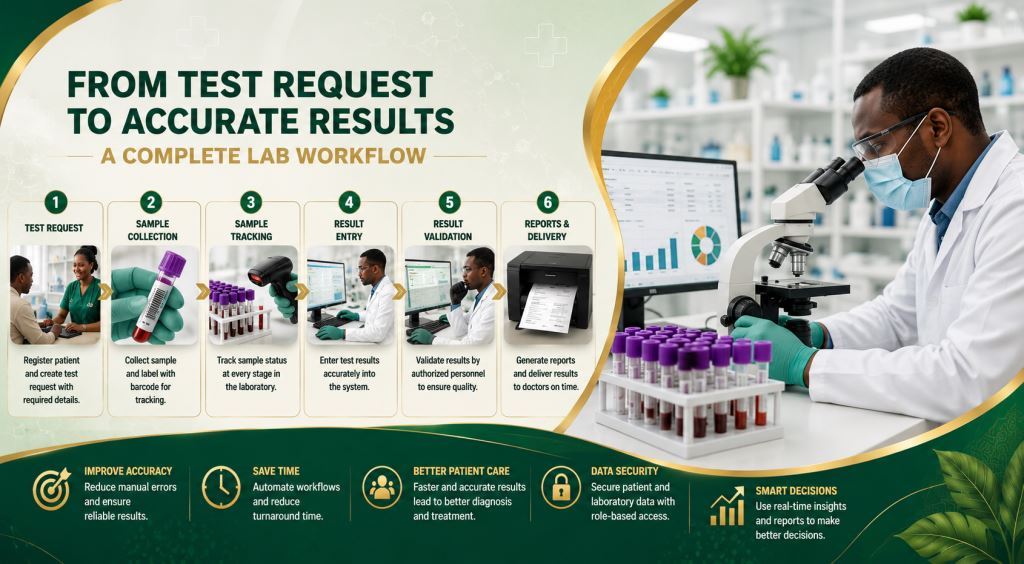
How to Implement Laboratory Test Management Software for Clinics Without Disrupting Daily Operations
Successful implementation begins with a simple workflow audit.
First, healthcare organizations should identify the records they manage, the reports they need, the users who require system access, and the operational challenges that currently slow down daily work.
This assessment enables Prosoft Africa to configure laboratory test management software for clinics according to the organization’s actual needs. As a result, the software supports existing workflows instead of forcing unnecessary changes.
Prepare Existing Data
Next, healthcare organizations should organize their existing records before importing them into the new system.
Healthcare facilities do not need to perfect every old record before starting the digitalization process. However, they should decide which information to import, which records to archive, and which data should be entered as new records.
In addition, many clinics, hospitals, laboratories, pharmacies, and healthcare centers discover duplicate patient records, missing balances, incomplete product lists, and outdated manual processes during this stage.
Organizing this information in advance makes implementation smoother and significantly improves data quality from the beginning.
Train the Staff
Staff training plays a critical role in the successful implementation of any healthcare management system.
For example, cashiers should learn cashier workflows, laboratory staff should focus on laboratory operations, managers should understand dashboards and reports, and administrators should master user permissions and system settings.
Furthermore, role-based training prevents information overload because each employee learns only the features required for their daily responsibilities.
Consequently, healthcare teams adopt laboratory test management software for clinics more quickly and use it with greater confidence.
Provide Post-Launch Support
Implementation should not end after installation.
Instead, managers should monitor data entry, review user activity, and answer questions during the first few weeks after deployment.
In addition, Prosoft Africa provides continuous technical support after implementation. The support team helps healthcare facilities adjust system settings, resolve operational challenges, and improve daily workflows.
As a result, organizations achieve faster user adoption and maximize the value of their investment.
Available Across Cameroon and Africa
Prosoft Africa provides installation, training, and technical support for laboratory test management software for clinics throughout Cameroon.
Healthcare organizations in Douala, Yaoundé, Buea, Bamenda, Limbe, Bafoussam, Garoua, Maroua, Ngaoundéré, Bertoua, and many other cities can benefit from these services.
However, the goal is not to create separate pages for every city. Instead, Prosoft Africa focuses on solving real operational challenges faced by healthcare organizations throughout Cameroon.
Furthermore, healthcare organizations outside Cameroon can request online demonstrations, remote installation, staff training, and continuous technical support.
Therefore, healthcare providers across Africa benefit from structured laboratory management software backed by a team that understands local challenges such as varying internet connectivity, different computer skill levels, multi-branch operations, and practical reporting requirements.
Decision Checklist Before Requesting a Demo
Before requesting a demonstration, prepare the information your healthcare organization needs.
First, identify the records that should be managed within the system.
Next, determine who should create, edit, approve, or only view each type of record.
In addition, prepare examples of the reports you want to generate, such as daily summaries, laboratory workloads, branch comparisons, balances, appointment lists, and financial dashboards.
Furthermore, choose a small implementation team that can test workflows, ask questions, and support other staff members after training.
Finally, confirm how the software will be supported after installation, especially if your organization plans to open new branches, hire additional staff, or implement new modules.
This preparation helps healthcare organizations implement laboratory test management software for clinics successfully while accelerating user adoption.
Frequently Asked Questions
Who Should Use Laboratory Test Management Software for Clinics?
This solution is ideal for clinic owners, hospital administrators, doctors, nurses, receptionists, cashiers, pharmacists, laboratory professionals, and healthcare managers who want cleaner records, faster reporting, and stronger control over daily laboratory operations.
Can the Software Support Users with Limited Computer Experience?
Yes.
In fact, the implementation includes practical role-based training, real-world examples, and continuous follow-up support.
As a result, users learn the tasks they perform every day and become comfortable using the software much more quickly.
Should Every Feature Be Activated on the First Day?
No.
Instead, healthcare organizations should begin with their highest-priority workflows.
Later, they can activate additional modules as staff become familiar with the system and gain confidence using it.
Conclusion
Choosing laboratory test management software for clinics is more than an IT decision. It is a strategic management decision that improves efficiency across the entire healthcare organization.
In fact, the right solution strengthens patient registration, appointment scheduling, consultations, billing, pharmacy management, laboratory reporting, user access, and administrative reporting.
As a result, healthcare teams work more efficiently, improve collaboration, and deliver better patient care.
Furthermore, Prosoft Africa helps clinics, hospitals, laboratories, pharmacies, and healthcare centers across Cameroon and Africa assess their needs, configure the right modules, train their teams, and provide continuous support after deployment.
Finally, request a demonstration today and discover how laboratory test management software for clinics can modernize your laboratory operations, improve reporting, and support better healthcare delivery throughout your organization.
Explore more expert articles on laboratory management software, hospital digital transformation, and healthcare technology across Cameroon and Africa to discover practical solutions and best practices for modern healthcare facilities.
Stay informed about the latest healthcare technology innovations by following Prosoft Africa on Facebook, Instagram, LinkedIn, X (Twitter), and TikTok. Discover laboratory test management software for clinics, live product demonstrations, customer success stories, and practical healthcare solutions helping organizations across Cameroon and Africa modernize their operations.
