
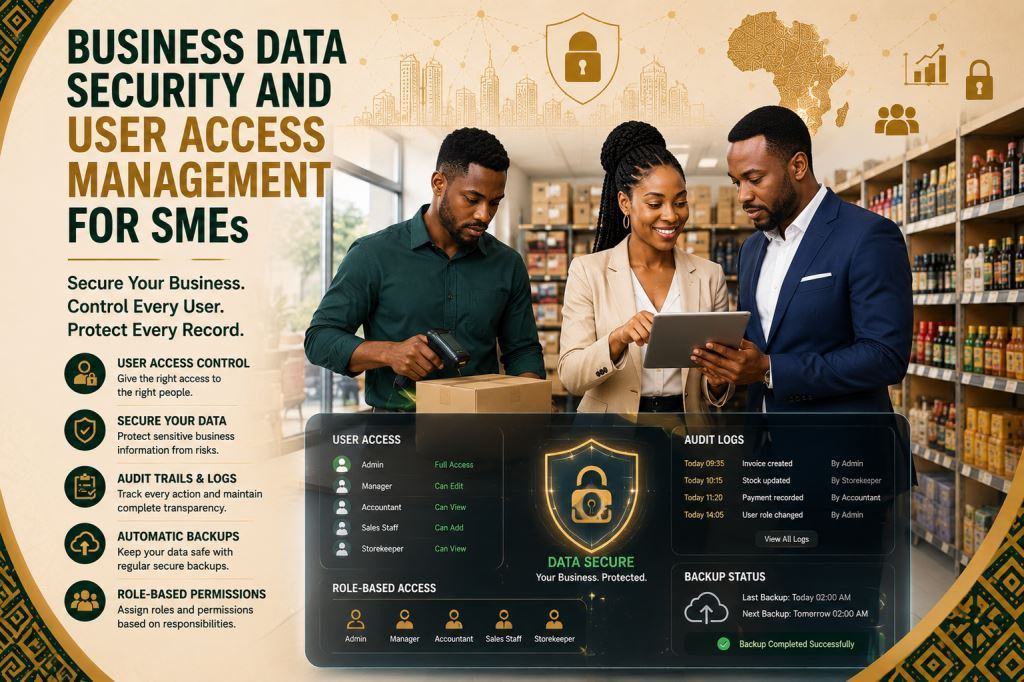
Business Data Security and User Access Management for SMEs
Business data security software SMEs is becoming essential for SMEs, retail shops, wholesalers, distributors, service businesses and growing companies. These organizations want to organize daily operations without relying only on paper records, WhatsApp messages or scattered spreadsheets.
Prosoft Africa helps SME owners, managers, accountants, sales teams, inventory staff, purchasing teams and branch supervisors use digital tools. These solutions improve record keeping, reporting and accountability across Cameroon and Africa.
Business security is not only about protecting servers. It is also about controlling who can view, edit, approve and export important business information.
This article explains how business data security software SMEs fits into a complete business management software strategy. It covers practical implementation, staff adoption, reporting, system setup and ongoing support. As a result, business owners and decision makers can better understand what to consider before choosing a software solution.
Explore our Business Management Software and see how business data security software SMEs protects data, user access and business operations.
Why This Topic Matters for Daily Operations
Many organizations experience difficulties when employees manage stock records, sales, invoices, quotations, customer information, supplier records, expenses, user access, branch activities and management reports in different notebooks, mobile phones, spreadsheets or through verbal communication.
This approach slows daily operations. It also makes information difficult to verify.
As a result, managers struggle to identify the correct record. They cannot always determine who entered the information. They also find it difficult to confirm whether reports accurately reflect business activities.
Several warning signs usually appear first. For example, stock records no longer match products on the shelves. In addition, employees continue creating invoices manually. Customer follow-up becomes inconsistent. Furthermore, expenses become difficult to monitor.
At first, these problems may seem minor. However, they become much more expensive as the organization grows. They also increase when employees change responsibilities or managers need reliable information to make important decisions.
A digital management system should reduce confusion without making daily work more complicated. Its purpose is not to replace professional judgment or local experience. Instead, it provides employees with a structured workflow while giving business owners a reliable view of business activities.
Furthermore, many organizations across Cameroon and Africa employ people with different levels of computer experience. Therefore, an effective solution should provide simple screens, clear workflows, user permissions, practical training and continuous support.
Key Features to Look For
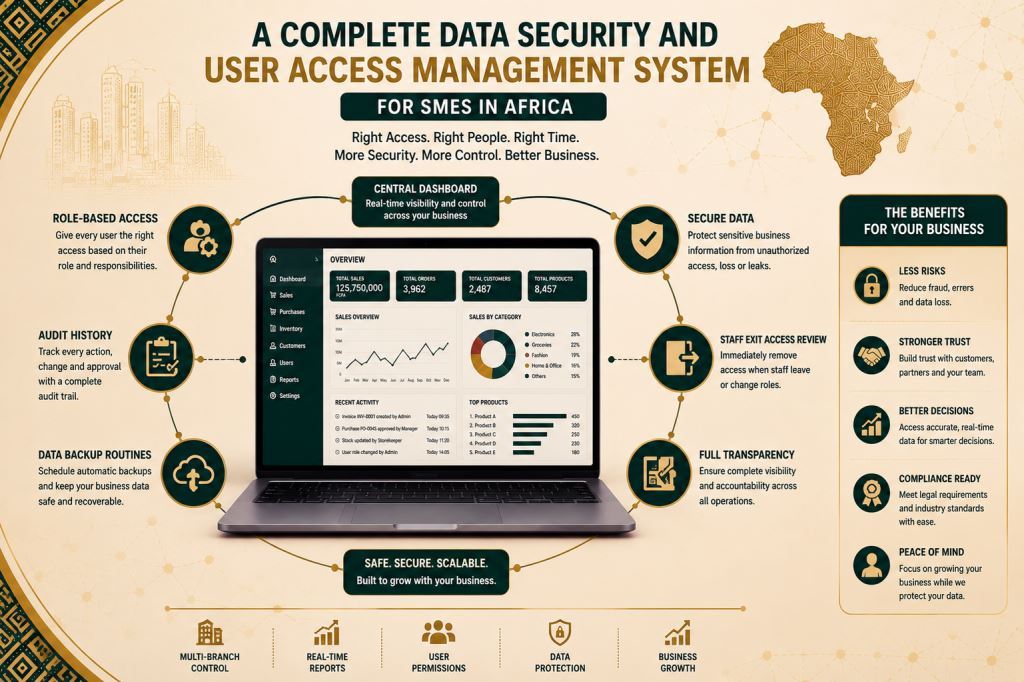
1. Role-Based Access
Role-based access should be easy for authorized employees to use during normal business operations. Staff should access only the information required for their responsibilities.
This feature helps organizations record information once, store it securely and make it available only to authorized users.
For SMEs, retail shops, wholesalers, distributors, service businesses and growing companies across Cameroon and Africa, role-based access strengthens security. It also reduces unnecessary access to sensitive business information.
When organizations configure role-based access correctly within business data security software SMEs, employees spend less time requesting permissions. They spend more time completing their daily responsibilities while protecting important business records. To strengthen user access management even further, explore our Employee Permissions & Branch Access Control Software for SMEs. This solution enables businesses to assign user permissions by role, department, and branch while improving data security, access control, and operational accountability across multiple business locations.
2. Audit History
Audit history should be simple for authorized employees to review during normal business operations. Managers should quickly see who created, modified or approved each record.
This feature records every important activity automatically. It also creates a reliable history that supports accountability and improves decision-making.
For SMEs, retail shops, wholesalers, distributors, service businesses and growing companies across Cameroon and Africa, audit history improves transparency. It also helps organizations investigate errors and resolve disputes more quickly.
When organizations configure audit history correctly within business data security software SMEs, managers spend less time checking records manually. Instead, they focus on improving operations and supporting their teams.
3. Data Backup Routines
Data backup routines protect important business information from accidental loss, hardware failure or unexpected system problems. Authorized employees should manage backups without unnecessary complexity.
This feature stores secure copies of business data at regular intervals. It also makes information easier to recover whenever necessary.
For SMEs, retail shops, wholesalers, distributors, service businesses and growing companies, regular backups improve business continuity and reduce operational risks.
When organizations configure data backup routines correctly within business data security software SMEs, they recover information more quickly. As a result, daily operations continue with fewer interruptions.
4. Staff Exit Access Review
Staff exit access review helps organizations remove system access when employees leave or change responsibilities. Managers should complete this process immediately after staff changes occur.
This feature protects confidential information. It also prevents former employees from accessing sensitive business records.
For organizations throughout Cameroon and Africa, staff exit access reviews strengthen security and improve access control.
When organizations configure staff exit access review correctly within business data security software SMEs, managers maintain better control over user accounts. Consequently, they reduce unnecessary security risks.
5. Sensitive Report Permissions
Sensitive report permissions allow organizations to control access to confidential reports. Only authorized employees should view or export sensitive information.
This feature protects financial reports, customer records and management information. It also reduces the risk of unauthorized access.
For SMEs, retail shops, wholesalers, distributors, service businesses and growing companies, sensitive report permissions improve confidentiality and strengthen internal controls.
When organizations configure sensitive report permissions correctly within business data security software SMEs, managers protect critical business information more effectively. Therefore, employees access only the reports required for their responsibilities.
6. Password Discipline
Password discipline encourages employees to use strong passwords and follow secure login practices. Every authorized user should protect personal login credentials.
This feature reduces unauthorized access. It also strengthens the overall security of the organization.
For businesses across Cameroon and Africa, password discipline supports safer daily operations and protects valuable information.
When organizations configure password policies correctly within business data security software SMEs, employees follow better security practices. As a result, organizations reduce the risk of data breaches and unauthorized access.
Benefits for Owners, Managers, Staff and Customers
Better Visibility
The first benefit is better visibility. Owners and managers no longer rely only on verbal updates or paper records. Instead, they review structured reports whenever they need them.
These reports show business activities, pending approvals, user actions and operational performance. They also help managers identify issues that require immediate attention.
Stronger Accountability
Another important benefit is stronger accountability. Every user signs in with an individual account and assigned permissions.
As a result, managers can easily identify who created, updated or approved each record. Accurate records replace assumptions and support better decisions. This approach also protects the organization while recognizing the work of responsible employees.
Faster Access to Information
The software also improves efficiency. Employees no longer search through paper files or ask colleagues for important information.
Instead, they use search tools, filters, dashboards and audit histories to locate records quickly. Consequently, they respond faster to managers, customers and suppliers.
Better Security Planning
Reliable records also strengthen security planning. Managers identify unusual activities that are difficult to detect with manual processes.
For example, they review login histories, permission changes, failed access attempts, audit records and user activities. They also identify outdated accounts that should be removed or updated.
These insights help business leaders strengthen security, improve internal controls, train employees and reduce unnecessary risks. To improve operational traceability even further, explore our Digital Records & Audit Trail Software for Growing African Businesses. This solution centralizes digital records, maintains a complete history of user activities, and provides a secure audit trail that simplifies internal reviews, compliance, and business accountability.
Review Existing Workflows
Implementation should begin with a workflow review. Before installing any software, the organization should identify the records it manages, the reports it needs and the employees who require access.
The team should also identify the daily challenges that reduce efficiency. This preparation allows Prosoft Africa to configure the software according to real business operations instead of assumptions.
Prepare Business Data
The next step is data preparation. Existing records do not need to be perfect before digitalization begins. However, the organization should decide which information to import, archive or recreate.
During this stage, many SMEs, retail shops, wholesalers, distributors, service businesses and growing companies discover duplicate records, missing information, outdated user accounts and inconsistent manual procedures.
Train Employees
Staff training follows data preparation. Every employee should learn only the features required for daily responsibilities.
Training should match each employee’s role. For example, administrators should learn user permissions and security settings. Managers should understand dashboards, audit histories and reports. Accountants should access only financial information. Inventory staff should use the tools assigned to their responsibilities.
This role-based approach improves learning. It also prevents employees from becoming overwhelmed by unnecessary features.
Provide Ongoing Support
The final step is post-launch support. During the first few weeks, managers should monitor user activity and review data accuracy.
They should also confirm that employees follow the new security procedures. Regular follow-up sessions with Prosoft Africa answer questions, adjust system settings and improve user adoption. As a result, organizations strengthen security and gain greater value from the software.
Available Across Cameroon and Africa
Prosoft Africa provides software setup, training and ongoing support for SMEs, retail shops, wholesalers, distributors, service businesses and growing companies across Cameroon.
The company serves organizations in Douala, Yaounde, Buea, Bamenda, Limbe, Bafoussam, Garoua, Maroua, Ngaoundere and Bertoua. However, this article focuses on solving real business challenges instead of repeating city-specific content.
Organizations outside Cameroon can also request online demonstrations, remote installation, virtual staff training and continuous technical support.
This approach benefits businesses throughout Africa. It also supports organizations that need structured management software and a partner who understands local business realities.
These realities include varying internet connectivity, different levels of computer experience, secure user access and practical reporting requirements.
Decision Checklist Before Requesting a Demo
Before requesting a demonstration, identify the records your organization wants to protect within the software. Then decide which employees should create, edit, approve or only view each type of information.
Next, prepare examples of the reports you expect to generate. These may include audit histories, user activity reports, login records, security reports or management dashboards.
Then, choose a small implementation team. This team should test the workflows, ask questions during training and support other employees after deployment.
Finally, confirm how technical support will continue after installation. This step becomes especially important when employees change roles, new users join the organization or additional software modules are required.
Frequently Asked Questions
Who Should Use Business Data Security Software SMEs?
Business data security software SMEs is suitable for SME owners, managers, accountants, sales teams, inventory staff, purchasing teams and branch supervisors. It helps organizations protect business data, control user access and improve daily operations.
Can the Software Support Users with Limited Computer Experience?
Yes. The implementation includes practical role-based training, simple examples and ongoing support. As a result, employees learn the tasks they perform every day with greater confidence.
Should Every Feature Be Activated on the First Day?
No. Most organizations achieve better results when they begin with the most important workflows. They can introduce additional modules after employees become comfortable with the software.
Conclusion
Choosing business data security software SMEs is an important business decision. The right solution helps organizations protect business data, control user access, manage records, monitor activities and generate reliable management reports within one secure system.
In addition, reliable security controls improve business visibility. Managers access accurate information more quickly. Employees retrieve records without unnecessary delays. Consequently, organizations strengthen security, improve accountability and reduce operational risks.
Prosoft Africa supports organizations throughout Cameroon and across Africa with software implementation, staff training and continuous technical support. Businesses that want to strengthen data security and user access management should request a demonstration and prepare a list of the security challenges they want to solve first.
Discover more expert articles on business data security, cybersecurity and business software across Cameroon and Africa.
Stay updated with Prosoft Africa on Facebook, Instagram, LinkedIn, X (Twitter), and TikTok for product news, tutorials and business technology insights.
