
Business Dashboards, Reports and Multi-Branch Management for Growing Companies

Business dashboards and multi-branch management is no longer only a technical idea for large organizations. For SMEs, shops, distributors, service businesses, agencies and growing companies in Cameroon and across Africa, it has become a practical way to reduce confusion, protect records and simplify daily administration. In fact, Prosoft Africa helps SME owners, shop managers, wholesalers, accountants, sales teams, inventory staff and growing companies move from scattered manual work to a more organized digital system through setup, training and ongoing support.

A good system should not simply look modern. Instead, it should solve the problems staff experience every day. It should help users find information quickly, reduce repeated data entry, simplify reporting and give managers a clearer view of daily operations.

Many organizations in Douala, Yaounde and other growing cities already face higher customer expectations, faster service demands and stronger accountability. Paper registers and disconnected spreadsheets may still work for a small operation. However, they become risky as the number of customers, transactions, users or branches increases. The right software provides structure while preserving the personal relationships that make African organizations trusted within their communities.

Business dashboards and branch reports become essential when an owner cannot be present in every shop or office at the same time. As a result, they make remote supervision more practical and more reliable.

business dashboards and multi-branch management with Prosoft Africa support.

Why This Topic Matters for Organizations in Cameroon and Africa

The first reason many organizations look for business management software is not fashion. Rather, it is frustration. Staff spend too much time confirming balances, searching for files, checking who collected money, rewriting information and explaining incomplete reports. When information is handled manually, every delay creates more work for someone else.

Common problems include stock differences between paper records and actual inventory, invoices that are difficult to trace and limited visibility into expenses and profits. Consequently, these issues often create mistrust between management, staff and clients. A cashier may have worked honestly, but clean digital records may be missing. A manager may need to make a quick decision, but the required figures may not be available. A staff member may need to assist a client immediately, but the necessary record may be stored in another office.

Supporting Business Growth

A second challenge is growth. A process that worked with one office or one branch may no longer work as the organization expands. More transactions, more users and greater expectations require stronger controls. Without a shared system, departments often develop separate methods. As a result, duplication increases, disagreements become more common and reporting becomes less reliable.

A third challenge is continuity. When a staff member leaves, becomes unavailable or changes responsibilities, the organization should not lose valuable knowledge. Therefore, a well-configured platform keeps information inside the business instead of inside one person’s notebook or phone. Digital management is not only about convenience. It is also about protecting institutional knowledge and supporting long-term stability.
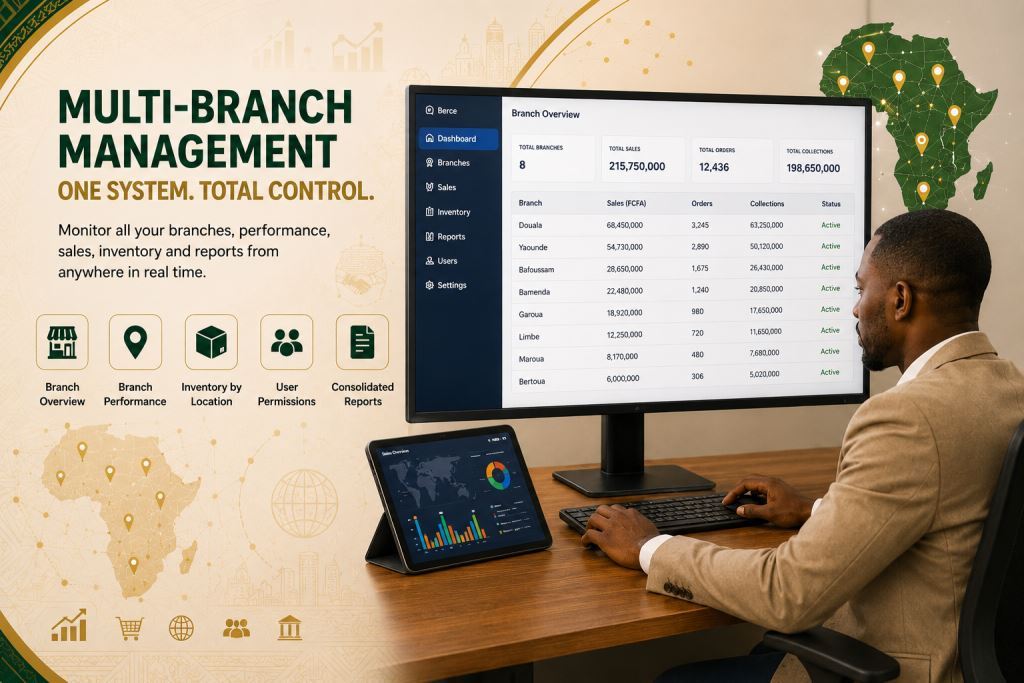
Key Features and Capabilities to Look For

Essential Business Management Features

Branch reports: this feature should remain simple for daily users and powerful enough for managers. In practice, it connects the topic to business dashboards, branch reporting, user activity, sales performance, inventory tracking, expenses and management reports. As a result, the organization avoids creating isolated records. When configured correctly, staff enter information once. Then, they verify it quickly. Finally, they reuse it in reports, dashboards and daily follow-up activities.

User permissions: this feature should remain easy for daily users while providing strong control for managers. In practice, it connects user access with business dashboards, branch reporting, sales information, inventory records, expenses and management reports. Therefore, the organization protects sensitive information and avoids unnecessary duplication. Once the configuration is complete, users access only the information they need. Next, managers review activities more efficiently. Finally, the organization improves accountability.

Sales dashboards: this feature should stay simple for everyday use while providing reliable information for management. Moreover, it connects sales activities with branch reports, inventory, expenses, customer information and business performance. As a result, managers gain a clearer picture of daily operations. Staff enter information once. Then, they review it quickly. Finally, they use it to produce accurate reports and dashboards.

Interactive dashboards become even more valuable when they provide detailed business analytics for owners, accountants and branch managers. Read our article Business Analytics Dashboard For Owners, Accountants And Branch Managers to discover how real-time analytics support better financial monitoring, operational control and strategic business decisions.

Preparing for Business Growth

Inventory by location: this feature should remain practical for daily users and dependable for managers. In practice, it connects inventory records with branch reports, sales dashboards, expenses and management reporting. Therefore, the organization reduces stock errors between locations. Once inventory is recorded correctly, staff verify it quickly. Then, they use the information for reporting and follow-up.

Daily summaries: this feature should provide quick access to important business information. In addition, it combines sales, expenses, stock movements, user activity and branch performance into one overview. As a result, managers spend less time collecting information and more time making decisions. Staff review the summaries quickly. Finally, they use them to support daily operations and reporting.

Owner alerts: this feature should deliver important updates without making the system difficult to use. Furthermore, it connects business events with dashboards, branch reports, inventory changes and financial activity. Therefore, owners receive important information quickly. They can review alerts, verify the related records and respond before small issues become larger problems.

Configuring the System Correctly

These features should never be activated without proper planning. The right configuration depends on the size of the organization, the number of users, the reports management requires and the level of control needed. Finally, Prosoft Africa can map the workflow before implementation. As a result, every feature supports a real business process instead of becoming an unused function.

Practical Benefits for Owners, Managers, Staff and Clients

The first benefit is better visibility. Owners and managers no longer need to depend on scattered explanations or incomplete updates. Instead, they can review structured information whenever they need it. Visibility does not mean monitoring staff unfairly. Rather, it provides the information managers need to identify problems early, support departments and make decisions based on reliable records.

The second benefit is stronger accountability. When every user has a defined role and every important action is linked to a user account, responsibilities become much clearer. As a result, staff members are protected from accusations that cannot be verified. Managers can also distinguish honest mistakes from repeated process problems.

business dashboards and multi-branch management with Prosoft Africa support.2

The third benefit is greater efficiency. A user who needs information should not move from office to office searching for paperwork. Instead, search tools, filters, dashboards and record histories make information easy to locate. This becomes especially valuable when customers are waiting, suppliers need confirmation or managers require immediate business reports.

The fourth benefit is better planning. With reliable business data, managers identify busy periods, slow sales, recurring expenses, inventory movements, branch performance and revenue trends. Therefore, they can prepare for operational challenges before they become urgent.

How to Implement the Software Without Confusing Your Team

Review Current Business Processes

Start with a workflow review. List the records the organization keeps, the reports management requires, the employees who use the information and the mistakes that occur most often.

Next, prepare the most important data before implementation. The system does not need every historical record on the first day. However, active records, user accounts, opening balances, inventory items and key business categories should be prepared carefully.

Then, define user roles. Owners, managers, accountants, cashiers, sales staff, inventory controllers and branch supervisors should not all receive the same permissions. As a result, access control keeps the system organized, secure and easier to manage.

Effective multi-branch management also depends on giving every employee the right level of access. Explore our article Employee Permissions And Branch-Level Access Control Software For SMEs to learn how user permissions improve security, strengthen accountability and simplify branch administration.

Train Staff Effectively

Training should focus on real business activities. Staff should learn how to register information, search records, generate reports, print receipts, correct approved mistakes and request support when necessary. This approach helps employees learn faster because the training reflects their daily responsibilities.

Finally, review system usage during the first weeks after launch. Managers should confirm that users enter information correctly, reports provide useful insights and old manual habits no longer create duplicate work.

Expand the System Gradually

The implementation should remain progressive. It is better to launch the essential workflow successfully than to activate every feature at the same time. Otherwise, users may become overwhelmed. Once employees are comfortable with the core functions, the organization can introduce advanced dashboards, branch reporting, inventory analytics, management reports, additional user permissions and other business modules as needed.

Available Across Cameroon and Africa

Prosoft Africa provides setup, training and technical support for SMEs, shops, distributors, service businesses, agencies and growing companies across Cameroon. Services are available in Douala, Yaounde, Buea, Bamenda, Limbe, Bafoussam, Garoua, Maroua, Ngaoundere, Bertoua and many other communities. As a result, this wording presents the service area naturally without repeating city names unnecessarily.

Organizations outside Cameroon can also request online demonstrations, remote setup assistance, staff training and continuous technical support. This approach allows businesses across Africa to benefit from structured business management software while receiving guidance throughout configuration, user adoption and reporting.

Discover how our business management software provides powerful business dashboards and efficient multi-branch management for growing companies.

Frequently Asked Questions

Is business dashboards and multi-branch management useful for small organizations?

Yes. Small organizations often benefit early because they establish good management practices before growth creates more complex challenges. In addition, the system can be configured according to the organization’s size, budget and daily workflow.

Can Prosoft Africa help with setup and training?

Yes. Prosoft Africa combines system setup, staff training and follow-up support. As a result, users understand the software more quickly while managers strengthen their operational processes.

Can the software support multiple users or branches?

Yes. A well-planned system supports different users, access permissions and reporting requirements. Therefore, organizations can control what each branch sees while allowing head office to monitor overall performance.

What is the first step to begin?

The first step is to request a demonstration, identify the most important operational challenges, prepare sample records and select the modules required for the first phase. As a result, implementation becomes more organized and easier to manage.

Conclusion

Choosing business dashboards and multi-branch management should be viewed as a business decision rather than simply a software purchase. The right solution helps organizations organize daily operations, protect records, improve reporting and support employees. As a result, it reduces confusion and strengthens day-to-day management. The best results come when software, training and management discipline progress together.

Prosoft Africa helps SMEs, shops, distributors, service businesses, agencies and growing companies across Cameroon and Africa review their workflows, select the right modules, train users and support adoption after implementation. Finally, request a demonstration, prepare questions about your current workflow and discover how the system can be configured for your real business operations.

Take your business to the next level with Prosoft Africa. Explore expert articles on business management software, ERP solutions, accounting, inventory management, sales, HR, payroll, CRM, and digital transformation across Africa. Visit our blog to discover practical strategies that improve productivity, reduce costs, and accelerate business growth.

Follow Prosoft Africa on Facebook, Instagram, LinkedIn, X (Twitter), and TikTok  for live demos, expert tips, customer success stories, and the latest business technology innovations helping companies across Africa operate more efficiently and grow with confidence.