
School Management Software Implementation Checklist for Principals and Bursars
School management software implementation checklist is becoming important for schools, colleges, bilingual institutions, training centers and education groups. These organizations want to organize daily work without depending only on paper, WhatsApp messages or scattered spreadsheets. Prosoft Africa helps school owners, principals, bursars, accountants, teachers, secretaries and administrative teams use digital tools for better records, clearer reports and practical accountability across Cameroon and Africa.
The success of school software depends less on installation speed. It depends more on how well people, records and responsibilities are prepared before launch.
This article explains how the topic fits into a complete school management software strategy. It focuses on practical use, staff adoption, reporting, setup and support. Decision-makers can understand what to look for before choosing a platform.
Why the School Management Software Implementation Checklist Matters for Daily Operations
The problem usually begins when admissions, student records, fees, exams, report cards, attendance, staff work and parent communication are managed in different notebooks, phones, spreadsheets or verbal instructions. The organization may still operate every day. However, it becomes difficult to know which record is final, who entered it and whether managers are seeing accurate information.
Common warning signs include manual student files, late fee reconciliation, slow report card preparation and unclear communication with parents. These problems may look small at first. However, they become expensive when the organization grows, staff change positions or managers need quick evidence to make decisions.
A digital system should reduce confusion without making the team feel lost. It should not replace professional judgment or local experience. Instead, it should give staff a shared structure for daily work and provide owners with a reliable view of what is happening.
In Cameroon and across Africa, many organizations also need a solution that works for users with different levels of computer experience. A good platform should provide simple screens, clear steps, user permissions, practical training and ongoing support that matches the team’s pace.
Every successful School Management Software Implementation Checklist begins with the right foundation. Explore how our School Management Software helps schools streamline administration, improve academic management, and support a successful implementation across Cameroon and Africa.
Key Features of a School Management Software Implementation Checklist
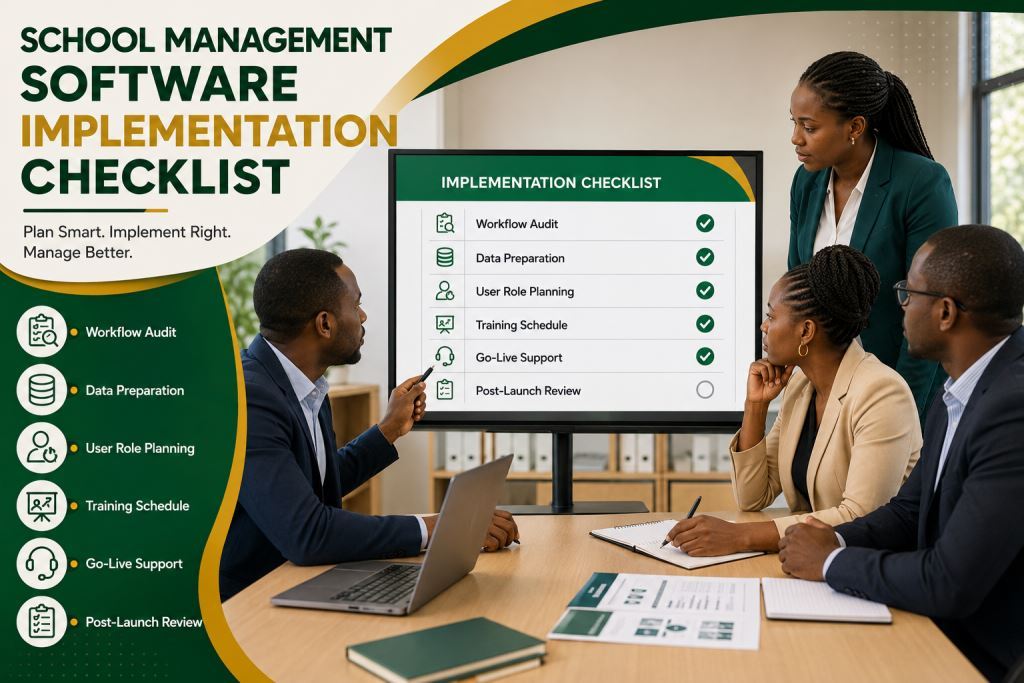
1. Process Review
Authorized staff should be able to use this capability during normal work, not only during end-of-month reporting. In practical terms, process review helps the organization capture the right information once, store it in the correct record and make it available whenever a manager, accountant or supervisor needs it.
For schools, colleges, bilingual institutions, training centers and education groups in Cameroon and Africa, this reduces repeated writing and improves everyday follow-up. When organizations configure process review properly inside the school management software implementation checklist, the team spends less time searching for information. They also spend more time serving parents, students, teachers, bursars, principals and owners with confidence.
2. Data Preparation
Authorized staff should be able to use this capability during normal work, not only during end-of-month reporting. In practical terms, data preparation helps the organization capture the right information once, store it in the correct record and make it available whenever a manager, accountant or supervisor needs it.
For schools, colleges, bilingual institutions, training centers and education groups in Cameroon and Africa, this reduces repeated writing and improves everyday follow-up. When organizations configure data preparation properly inside the school management software implementation checklist, the team spends less time searching for information. They also spend more time serving parents, students, teachers, bursars, principals and owners with confidence.
3. User Role Planning
Authorized staff should be able to use this capability during normal work, not only during end-of-month reporting. In practical terms, user role planning helps the organization capture the right information once, store it in the correct record and make it available whenever a manager, accountant or supervisor needs it.
For schools, colleges, bilingual institutions, training centers and education groups in Cameroon and Africa, this reduces repeated writing and improves everyday follow-up. When organizations configure user role planning properly inside the school management software implementation checklist, the team spends less time searching for information. They also spend more time serving parents, students, teachers, bursars, principals and owners with confidence.
4. Training Schedule
Authorized staff should be able to use this capability during normal work, not only during end-of-month reporting. In practical terms, a training schedule helps the organization capture the right information once, store it in the correct record and make it available whenever a manager, accountant or supervisor needs it.
For schools, colleges, bilingual institutions, training centers and education groups in Cameroon and Africa, this reduces repeated writing and improves everyday follow-up. When organizations configure the training schedule properly inside the school management software implementation checklist, the team spends less time searching for information. They also spend more time serving parents, students, teachers, bursars, principals and owners with confidence.
5. Go-Live Support
Authorized staff should be able to use this capability during normal work, not only during end-of-month reporting. In practical terms, go-live support helps the organization capture the right information once, store it in the correct record and make it available whenever a manager, accountant or supervisor needs it.
For schools, colleges, bilingual institutions, training centers and education groups in Cameroon and Africa, this reduces repeated writing and improves everyday follow-up. When organizations configure go-live support properly inside the school management software implementation checklist, the team spends less time searching for information. They also spend more time serving parents, students, teachers, bursars, principals and owners with confidence.
6. Post-Launch Audit
Authorized staff should be able to use this capability during normal work, not only during end-of-month reporting. In practical terms, post-launch audit helps the organization capture the right information once, store it in the correct record and make it available whenever a manager, accountant or supervisor needs it.
For schools, colleges, bilingual institutions, training centers and education groups in Cameroon and Africa, this reduces repeated writing and improves everyday follow-up. When organizations configure post-launch audit properly inside the school management software implementation checklist, the team spends less time searching for information. They also spend more time serving parents, students, teachers, bursars, principals and owners with confidence.
Benefits of a School Management Software Implementation Checklist
The first benefit is visibility. Owners and managers no longer need to depend only on verbal summaries. Instead, they can review information through structured reports. This helps them see what happened today, what is delayed, what needs approval and which department or branch needs attention.
The second benefit is accountability. When users log into the system with their own roles, it becomes easier to know who created a record, who edited it and who approved it. This protects the organization. It also protects honest staff because evidence supports their work instead of memory.
The third benefit is speed. People who need a record should not move from office to office searching for paper. Search tools, filters, dashboards and histories make information easier to find. This is especially important when the organization is busy or when clients, parents, patients or customers are waiting.
The fourth benefit is planning. Good records reveal patterns that are difficult to see manually. These patterns include busy days, slow periods, recurring delays, stock movements, fee balances, appointment pressure, customer habits and branch performance. Leaders use this information to decide what to correct, what to buy, who to train and where to invest next.
How to Implement a School Management Software Implementation Checklist Without Confusing the Team
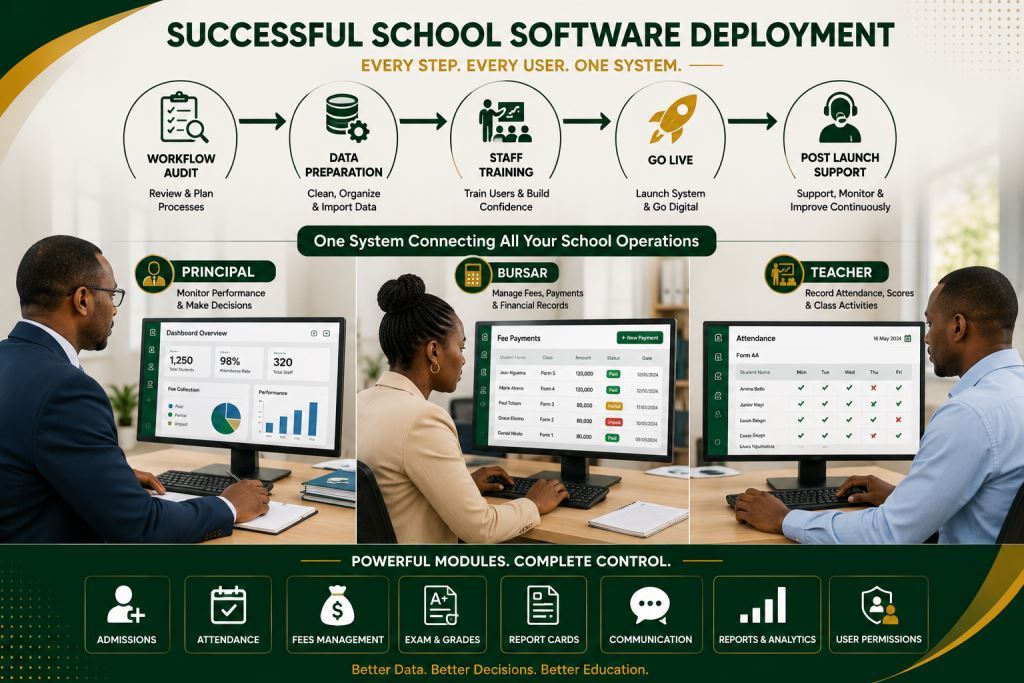
Implementation should begin with a simple workflow audit. Before any software setup, the organization should list the records it keeps, the reports it needs, the users who must access information and the mistakes that currently waste time.
Conduct a Workflow Audit
The second step is data preparation. Old records do not need to be perfect before digitalization starts. However, the team must agree on what to import, what to archive and what to start fresh.
For many schools, colleges, bilingual institutions, training centers and education groups, this stage reveals duplicate names, missing balances, unclear product lists and old manual habits.
Well-structured student data forms the foundation of every successful implementation. Our Student Information System helps schools centralize student records, improve data accuracy, and simplify administrative management across Cameroon and Africa.
Prepare Data Before Implementation
The third step is staff training. Training should be practical and role-based. A cashier should learn cashier tasks. An administrator should learn reports and permissions. A manager should learn dashboards. A stock controller should learn stock movements. This avoids overwhelming users with features they do not use daily.
Provide Post-Launch Support
The fourth step is post-launch support. During the first weeks, managers should check whether users enter data correctly, whether reports are useful and whether old manual habits return. A short follow-up with Prosoft Africa can correct settings, answer questions and improve adoption.
School Management Software Implementation Checklist Across Cameroon and Africa
Prosoft Africa provides setup, training and support for schools, colleges, bilingual institutions, training centers and education groups across Cameroon, including Douala, Yaounde, Buea, Bamenda, Limbe, Bafoussam, Garoua, Maroua, Ngaoundere and Bertoua.
This content should not become a thin city page repeated for every location. Instead, describe the service area naturally while focusing on real operational problems.
Organizations outside Cameroon can also request online demos, remote installation guidance, staff training and continuous support. This helps African teams that need structured management software but also require support for local realities such as mixed connectivity, different skill levels, multi-branch operations and practical reporting needs.
Vocational training centers and professional institutes often require additional tools to manage practical courses, student records, assessments, fee collection, and daily administration. Learn how our School ERP for Vocational Training Centers and Professional Institutes helps these institutions successfully implement and manage their digital operations across Cameroon and Africa.
Decision Checklist Before Requesting a Demo
Before requesting a demo, list the exact records that the system must manage. Also decide who can create, edit, approve or only view each record.
Prepare sample reports that you want to see. These may include daily summaries, branch comparisons, balances, stock movements, appointment lists, staff activity and financial dashboards.
Choose a small launch team. This team should test the workflow, ask questions and help other users understand the system after training.
Confirm how the system will be supported after installation. This is important when staff change, new branches open or the organization needs extra modules.
Frequently Asked Questions About the School Management Software Implementation Checklist
Who should use the school management software implementation checklist?
It is useful for school owners, principals, bursars, accountants, teachers, secretaries and administrative teams. They want cleaner records, faster reports and better control of daily operations.
Can the software support users with limited computer experience?
Yes. The deployment should include simple role-based training and practical examples. It should also include follow-up support so users learn the tasks they perform daily.
Should every feature be activated on the first day?
No. Many organizations get better results when they start with the most important workflows. They can add more modules later when the team becomes comfortable.
Conclusion
Choosing a school management software implementation checklist should be a management decision, not only an IT purchase. The right solution gives structure to admissions, student records, fees, exams, report cards, attendance, staff work and parent communication. It also keeps the process simple for real users.
Prosoft Africa helps organizations in Cameroon and across Africa review their needs, configure the right modules, train teams and support adoption after launch. To move forward, request a demo and list the daily problems you want the software to solve first.
Explore more expert articles on school management software implementation checklist, school digital transformation, and education technology across Cameroon and Africa to deepen your understanding.
Stay connected with Prosoft Africa on Facebook, Instagram, LinkedIn, X (Twitter), and TikTok to explore smart school solutions, real-life demos, success stories, and the latest updates in education across Africa.
