
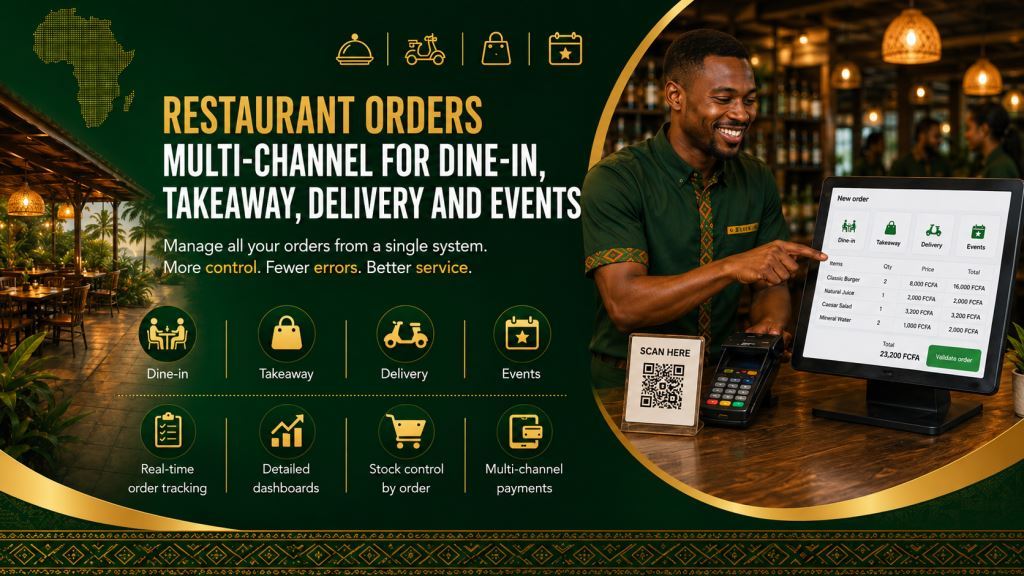
Multi-Channel Restaurant Orders for Dine-In, Takeaway, Delivery and Events
Multi-Channel Restaurant Orders for Dine-In, Takeaway, Delivery and Events is an important topic for restaurants, bars, snacks, bakeries, hotels and food businesses that want stronger control, cleaner records and more reliable daily management in Cameroon and across Africa. Prosoft Africa approaches multi-channel restaurant order management as part of a complete management system, not as a small isolated feature that creates another disconnected file for staff to maintain.
Many organizations already have hardworking teams, but the teams often operate with scattered notebooks, spreadsheets, phone messages, handwritten approvals and reports that arrive late. When restaurant owners, managers, cashiers, waiters, kitchen supervisors, stock controllers and accountants search for multi-channel restaurant order management, they are usually trying to solve a real operational problem: they want dependable records that remain useful after the busy day is over.
This article explains why this workflow matters, the common problems it solves, the features to request, how to prepare staff for adoption and how Prosoft Africa can support implementation.
Why this topic matters for growing organizations
A growing organization can look active and successful while its internal information is difficult to trust. A cashier may know one version of the truth, a manager may have another version, and an owner may only see a summary days later. The result is confusion around records, approvals, balances, stock, payments or reports. Multi-Channel Restaurant Orders for Dine-In, Takeaway, Delivery and Events helps reduce that confusion by bringing the workflow into a structured digital process.
The value of multi-channel restaurant order management is not only that it saves time. It also protects decisions. If management wants to know what happened yesterday, which user changed a record, which customer or student is affected, which item moved, or which report should be reviewed, the system should provide a clear path. That path is hard to maintain when records are spread across paper files and personal devices.
For Cameroon and other African markets, the system should be practical. It should respect mixed internet quality, different staff skill levels, bilingual communication needs, local payment habits, and the fact that many teams are moving gradually from manual work to digital work. A good platform must be powerful enough for management and simple enough for everyday users.
Common Problems This Workflow Helps Solve
Orders Recorded in Different Places
Many restaurants record dine-in, takeaway, delivery and event orders in separate notebooks or spreadsheets. As a result, staff spend more time searching for information and important details can be missed. A centralized workflow keeps every order in one system and gives managers a complete overview of daily operations.
Delivery and Table Orders Become Mixed
Delivery orders are sometimes difficult to separate from dine-in or table service. Consequently, employees spend extra time checking transactions and correcting mistakes. A restaurant management system clearly identifies each sales channel and improves reporting accuracy.
Efficient multi-channel order management also depends on a well-organized table service process. Read our article Waiter Order Taking App And Table Service Workflow For Restaurants to discover how digital waiter order taking improves communication between dining areas and the kitchen while reducing service errors.
Event Orders Affect Stock Planning
Large event orders can quickly disrupt stock planning when they are not tracked correctly. Therefore, restaurants may experience shortages or unnecessary purchases. A digital workflow records every order and helps managers prepare inventory in advance.
Limited Visibility Across Sales Channels
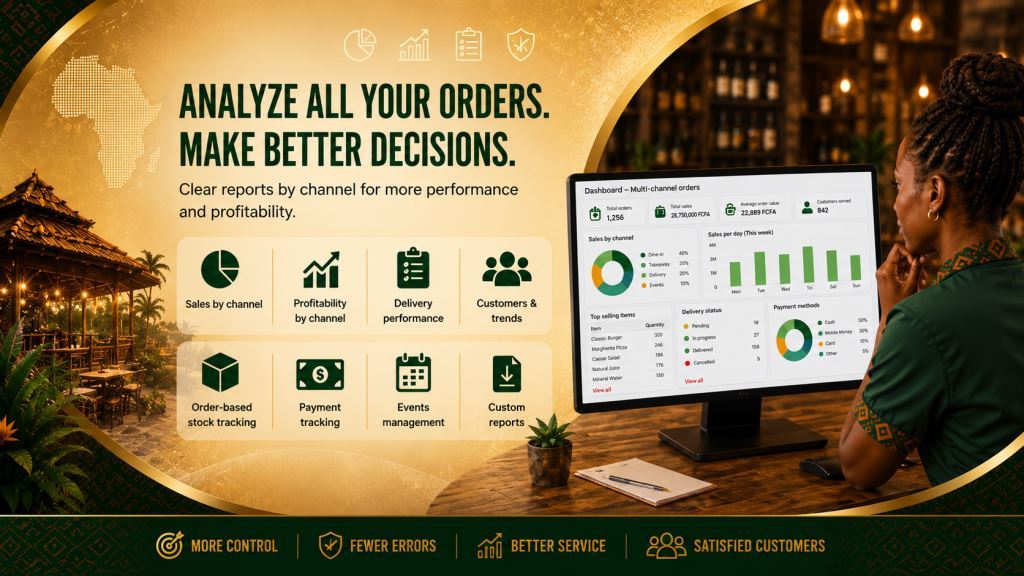
Managers do not always know which sales channel generates the highest revenue. Instead, they often rely on estimates or manual calculations. A centralized system provides detailed reports for dine-in, takeaway, delivery and event sales, making business decisions easier.
Knowledge Depends on One Person
Some organizations rely heavily on one employee who remembers every process. Although that person may be experienced, the business becomes vulnerable when critical information stays in one person’s memory. Instead, a structured system stores information in a shared database so authorized staff can access the same records whenever they need them.
Key software features to request
1. Order channel selection
This feature should be configured around the way the team actually works. It should reduce repeated entry, keep important records connected and make it easy for authorized users to review what happened. In a complete Prosoft Africa setup, order channel selection should support the wider modules around orders, tables, POS sales, stock, purchases, staff shifts, expenses, delivery, customers and reports so the organization does not create a new island of data.
2. Separate dine-in takeaway and delivery reports
This feature should be configured around the way the team actually works. It should reduce repeated entry, keep important records connected and make it easy for authorized users to review what happened. In a complete Prosoft Africa setup, separate dine-in takeaway and delivery reports should support the wider modules around orders, tables, POS sales, stock, purchases, staff shifts, expenses, delivery, customers and reports so the organization does not create a new island of data.
3. Table and customer references
This feature should be configured around the way the team actually works. It should reduce repeated entry, keep important records connected and make it easy for authorized users to review what happened. In a complete Prosoft Africa setup, table and customer references should support the wider modules around orders, tables, POS sales, stock, purchases, staff shifts, expenses, delivery, customers and reports so the organization does not create a new island of data.
4. Delivery status notes
This feature should be configured around the way the team actually works. It should reduce repeated entry, keep important records connected and make it easy for authorized users to review what happened. In a complete Prosoft Africa setup, delivery status notes should support the wider modules around orders, tables, POS sales, stock, purchases, staff shifts, expenses, delivery, customers and reports so the organization does not create a new island of data.
5. Event or bulk order records
This feature should be configured around the way the team actually works. It should reduce repeated entry, keep important records connected and make it easy for authorized users to review what happened. In a complete Prosoft Africa setup, event or bulk order records should support the wider modules around orders, tables, POS sales, stock, purchases, staff shifts, expenses, delivery, customers and reports so the organization does not create a new island of data.
6. Stock deduction by order type
This feature should be configured around the way the team actually works. It should reduce repeated entry, keep important records connected and make it easy for authorized users to review what happened. In a complete Prosoft Africa setup, stock deduction by order type should support the wider modules around orders, tables, POS sales, stock, purchases, staff shifts, expenses, delivery, customers and reports so the organization does not create a new island of data.
7. Payment channel tracking
This feature should be configured around the way the team actually works. It should reduce repeated entry, keep important records connected and make it easy for authorized users to review what happened. In a complete Prosoft Africa setup, payment channel tracking should support the wider modules around orders, tables, POS sales, stock, purchases, staff shifts, expenses, delivery, customers and reports so the organization does not create a new island of data.
8. Management review of channel profitability
This feature should be configured around the way the team actually works. It should reduce repeated entry, keep important records connected and make it easy for authorized users to review what happened. In a complete Prosoft Africa setup, management review of channel profitability should support the wider modules around orders, tables, POS sales, stock, purchases, staff shifts, expenses, delivery, customers and reports so the organization does not create a new island of data.
Evaluating the profitability of each sales channel becomes even more valuable when combined with menu performance analysis. Explore our article Restaurant Menu Performance Dashboard For Popular And Profitable Items to learn how detailed menu analytics help restaurant owners identify their most profitable products and make better business decisions.
The best implementation does not activate every possible option on the first day. The first phase should cover the workflows that create the most confusion or financial risk. After staff become comfortable, management can add more advanced controls, reports, reminders, branches or approval levels.
How the workflow should run in daily operations
A strong workflow begins with clean master data. For restaurants, bars, snacks, bakeries, hotels and food businesses, this may include people records, item lists, prices, branches, departments, classes, services, tables, suppliers, user accounts and report categories. When the starting data is clean, daily actions become easier to understand and reports become more trustworthy.
The second step is controlled entry. Staff should know where a transaction begins, which fields are required, what proof is needed, which user has permission, and when a supervisor must approve an exception. Clear entry rules reduce duplicate work and prevent staff from inventing their own unofficial process when pressure increases.
The third step is review. Managers should not wait until the end of the month to discover problems. Daily and weekly summaries help them see unusual balances, missing records, slow-moving stock, unconfirmed payments, delayed tasks or repeated corrections. A dashboard is most valuable when it shows what needs attention, not only what looks good.
Benefits for managers, staff and customers
Visibility improves because managers can review current records instead of waiting for verbal updates, late spreadsheets or end-of-month surprises.
Accountability improves because sensitive actions can be tied to a role, a user, a date, a reason and a clear approval path.
Speed improves because staff can search, filter, print, update and report from one system instead of moving between notebooks and disconnected files.
Decision making improves because reports show patterns that are difficult to see manually, including delays, losses, weak collections, slow stock movement and busy periods.
Trust improves because clients, parents, patients, customers or managers receive clearer information, cleaner receipts and more professional responses.
For staff, the benefit is also emotional. When the system is clear, employees do not have to defend themselves with memory alone. They can point to a record, a receipt, a status, a note or an approval. This reduces conflict and helps new employees learn the standard process faster.
For owners and senior managers, multi-channel restaurant order management creates a foundation for growth. A small organization can survive with informal methods for a while, but expansion exposes weak systems. Multiple branches, more customers, more students, more patients, more stock items or more employees all require stronger reporting and access control.
Implementation steps with Prosoft Africa
Start with a discovery discussion where the team explains current workflows, pain points, reports and approval rules.
Prepare data before setup by cleaning names, item lists, account categories, services, prices, contacts and old balances where relevant.
Configure modules in a practical order so the first launch solves priority problems instead of overwhelming staff.
Train users by role, because cashiers, accountants, reception staff, teachers, waiters, pharmacists, stock officers and owners do not need the same screens every day.
Run a pilot period where common mistakes are corrected, report formats are reviewed and management confirms that the workflow matches real operations.
Continue support after launch so the organization can add reports, adjust permissions, improve data quality and strengthen adoption over time.
Prosoft Africa provides setup, training and support for restaurants, bars, snacks, hotels and food businesses across Cameroon, including Douala, Yaounde, Buea, Bamenda, Limbe, Bafoussam, Garoua, Maroua, Ngaoundere, Bertoua and other communities. Food businesses in other African countries can also request demos, remote setup assistance and ongoing support.
Discover how our restaurant management software simplifies multi-channel restaurant order management by centralizing all orders in one system.
Frequently asked questions
Is multi-channel restaurant order management only for large organizations?
No. A smaller organization can benefit if the workflow is causing repeated errors, delayed reports or weak accountability. The setup can begin simply and grow over time.
Should we replace every manual process immediately?
Not always. A phased rollout is usually safer. Start with the records and reports that matter most, then add more controls when staff understand the system.
Can staff with limited computer skills use the system?
Yes, if training is practical and role-based. Users should practice the exact tasks they perform daily instead of receiving only a general lecture.
What should we prepare before requesting a demo?
Prepare sample records, the current report format, common problems, user roles and the decisions management wants to make from the dashboard.
How does Prosoft Africa support clients after setup?
Support can include remote assistance, staff guidance, configuration review, report improvements and advice as the organization grows into more modules.
Multi-Channel Restaurant Orders for Dine-In, Takeaway, Delivery and Events is more than a software feature. It helps restaurants, bars, snacks, bakeries, hotels and food businesses organize orders more efficiently, reduce confusion and improve accountability. In addition, staff work faster because they can access accurate information from a single system.
When the workflow is well organized, managers receive reliable reports and make better decisions. As a result, daily operations become easier to monitor, customer service improves and the team works with greater confidence.
Prosoft Africa supports restaurants, bars, snacks, bakeries, hotels and food businesses throughout Cameroon and across Africa. The company provides software installation, user training and continuous technical support. Finally, organizations that want to replace scattered records with structured digital management can request a demonstration and choose a solution that fits their operational needs.
Discover how Prosoft Africa Restaurant Management Software simplifies order management, table reservations, sales, inventory, purchasing, kitchen operations, cashier management, staff management and daily restaurant operations. Explore our other restaurant management solutions to find the best fit for your restaurant, hotel, café, fast-food business or catering service.
Follow Prosoft Africa onFacebook, Instagram, LinkedIn, X (Twitter) and TikTok for live demos, customer success stories and expert insights. Discover the latest innovations helping restaurants, hotels, cafés and food service businesses across Cameroon and Africa improve daily operations.
