

Business Cashier Control and Daily Closing Reports for SMEs
Business cashier control software SMEs is a serious management topic for shops, SMEs, distributors, service companies, branches and growing businesses that want cleaner records, faster decisions and better accountability. The goal of this article is to help SME owners, shop managers, distributors, accountants, cashiers, sales teams and branch supervisors understand what the software should organize, which mistakes to avoid and how to prepare a practical deployment.
For many organizations, the challenge is not only the absence of software. Teams often scatter important information across notebooks, spreadsheets, phones, receipt books and verbal updates. As a result, managers spend too much time asking for explanations. They spend too little time improving service quality. A good system turns daily work into structured records. Staff can search, check and report these records easily.
In this context, cashier control connects receipts, expenses, payment methods and closing reports. Owners can therefore trust daily business numbers. In addition, the best approach is to connect the topic to a complete business management software strategy. That strategy includes sales, invoices, receipts, stock, purchases, suppliers, customers, expenses, staff access and dashboards. This approach prevents the organization from buying a single isolated tool. Instead, it builds a management foundation that can support growth, new users, additional branches and stronger reporting over time.
Why this topic matters for daily operations
Daily operations create small decisions every hour. Staff determine who entered a record, which payment was accepted, which item moved from stock, which person needs follow-up, which report should be reviewed and which manager must approve a correction. When one system does not capture these decisions, the organization becomes dependent on memory. Memory may work when the team is small. However, it breaks down when activity increases.
A strong digital workflow helps staff follow the same steps, even when the office is busy. It reduces confusion because each role knows what to enter, what to approve and what to review. Furthermore, it helps owners and administrators see the difference between a normal delay and a real operational risk. This is why software must be planned as an administrative improvement, not just as a computer purchase.
In Cameroon and other African markets, organizations also need practical deployment. Internet availability, staff computer experience, language needs, hardware budgets and branch distance can differ from one location to another. A useful system should therefore be clear, trainable and adaptable. It should support the way people actually work while gradually improving discipline and record quality.
The strongest sign of a good implementation is not a long feature list. It is the moment when users stop asking where information is kept because the workflow itself points them to the right record. That is the level of organization SME owners, shop managers, distributors, accountants, cashiers, sales teams and branch supervisors should expect when reviewing software for this topic.
Common problems this software should solve
Cashier access and daily transactions
One common problem is that several cashiers share one password. At first, the issue may look small, especially if a trusted staff member knows the details. However, when the same issue appears every week, it becomes a management weakness. Software should make the record visible. It should then connect the record to the right person or transaction. Finally, it should keep enough history for the team to understand what happened.
Another common problem is that daily sales are mixed with petty expenses. At first, the issue may look small, especially if a trusted staff member knows the details. Nevertheless, when the same issue appears every week, it becomes a management weakness. The system should make the record visible. It should also connect the record to the right person or transaction. In addition, it should keep enough history for the team to understand what happened.
Cash closing and verification
One common problem is that closing totals are written on paper. At first, the issue may look small, especially if a trusted staff member knows the details. On the other hand, when the same issue appears every week, it becomes a management weakness. The software should make the record visible. It should connect the record to the right person or transaction. It should also keep enough history for the team to understand what happened.
Another common problem is that owners cannot verify corrections. At first, the issue may look small, especially if a trusted staff member knows the details. Even so, when the same issue appears every week, it becomes a management weakness. This solution should make the record visible. It should also connect the record to the right person or transaction. Finally, it should keep enough history for the team to understand what happened.
One more common problem is that cash differences are explained too late. At first, the issue may look small, especially if a trusted staff member knows the details. Despite that, when the same issue appears every week, it becomes a management weakness. The application should make the record visible. It should connect the record to the right person or transaction. It should also keep enough history for the team to understand what happened.
Record control and accountability
Another problem is that managers often receive summaries without supporting details. A total can look correct while the source of the total remains unclear. Therefore, reliable software should allow an administrator to move from a summary to the supporting records, such as receipts, orders, attendance, invoices, balances, stock movements or service notes, depending on the organization.
A third problem is that corrections are made informally. Every serious organization needs the ability to correct mistakes. However, managers should control corrections. In addition, the system should show who made the change, why the change was needed and whether a supervisor approved it. As a result, this approach protects both the organization and honest staff members.
Key features to look for
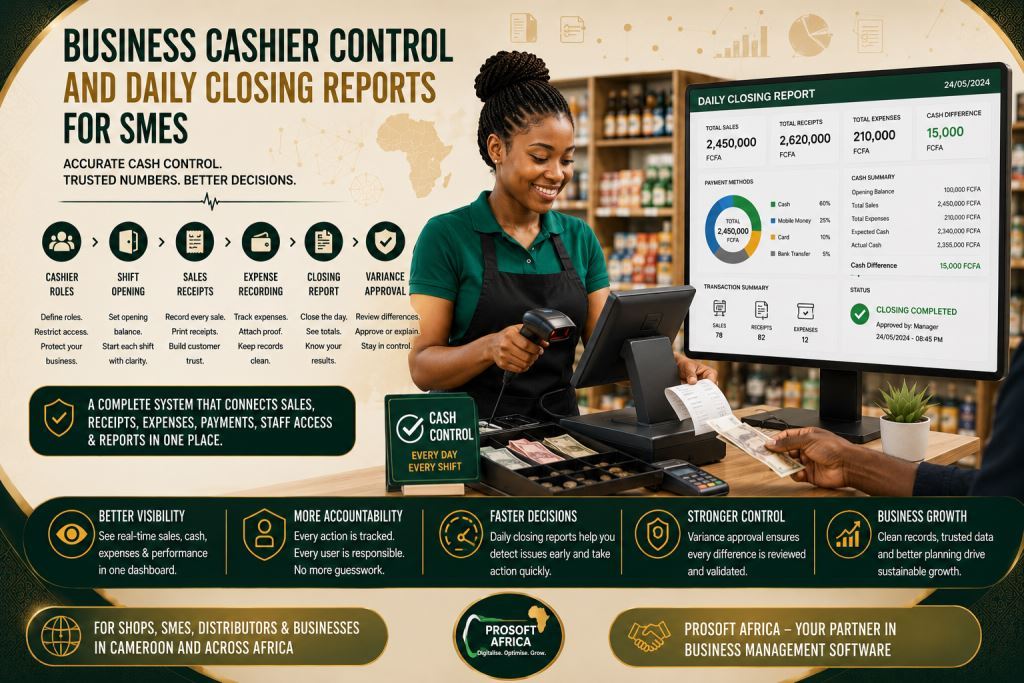
Cashier roles
Cashier roles should be simple enough for daily users and strong enough for managers. In practical use, this feature connects the topic to sales, invoices, receipts, stock, purchases, suppliers, customers, expenses, staff access and dashboards. As a result, the organization avoids creating another isolated record. When configured well, it helps staff enter information once. They can then verify it quickly and reuse it in reports, receipts, dashboards or follow-up actions.
Shift opening
Shift opening should be simple enough for daily users and strong enough for managers. In practical use, this feature connects the topic to sales, invoices, receipts, stock, purchases, suppliers, customers, expenses, staff access and dashboards. In this way, the organization avoids creating another isolated record. When configured well, it helps staff enter information once. Users can then verify it quickly and reuse it in reports, receipts, dashboards or follow-up actions.
Sales receipts
Sales receipts should be simple enough for daily users and strong enough for managers. In practical use, this feature connects the topic to sales, invoices, receipts, stock, purchases, suppliers, customers, expenses, staff access and dashboards. Therefore, the organization does not create another isolated record. When configured well, it helps staff enter information once. They can also verify it quickly and reuse it in reports, receipts, dashboards or follow-up actions.
Expense recording
Expense recording should be simple enough for daily users and strong enough for managers. In practical use, this feature connects the topic to sales, invoices, receipts, stock, purchases, suppliers, customers, expenses, staff access and dashboards. Consequently, the organization keeps all related information together instead of creating another isolated record. When configured well, it helps staff enter information once. Afterwards, they can verify it quickly and reuse it in reports, receipts, dashboards or follow-up actions.
Accurate cashier control also depends on properly recording and monitoring every business expense. Read our article Expense Tracking Software For SMEs Cameroon And Profit Management to discover how structured expense management improves financial transparency, simplifies reporting and helps businesses maintain better control over daily operating costs.
Closing report
The closing report should be simple enough for daily users and strong enough for managers. In practical use, this feature connects the topic to sales, invoices, receipts, stock, purchases, suppliers, customers, expenses, staff access and dashboards. Moreover, it prevents the organization from creating another isolated record. When configured well, it helps staff enter information once. They can then verify it quickly and reuse it in reports, receipts, dashboards or follow-up actions.
Variance approval
Variance approval should be simple enough for daily users and strong enough for managers. In practical use, this feature connects the topic to sales, invoices, receipts, stock, purchases, suppliers, customers, expenses, staff access and dashboards. This approach prevents the organization from creating another isolated record. When configured well, it helps staff enter information once. Finally, they can verify it quickly and reuse it in reports, receipts, dashboards or follow-up actions.
These features should not be activated blindly. The right configuration depends on the size of the organization, the number of users, the reports required by management and the level of control needed. Prosoft Africa can help map the workflow before implementation. As a result, every feature supports a real task instead of becoming unused decoration.
Benefits for owners, managers, staff and users
The first benefit is visibility. Owners and managers no longer need to wait for scattered verbal updates. Instead, they can review structured information. Visibility does not mean spying on staff. Rather, it gives responsible leaders the information they need to detect issues early, support departments properly and make decisions based on reliable records.
The second benefit is accountability. When every user has a role and the system links every important action to a user account, the organization can understand responsibility more fairly. The system protects staff members from accusations that managers cannot verify. At the same time, leaders can separate honest mistakes from repeated process problems.
The third benefit is speed. A user who needs a record should not move from office to office searching for paper. Search tools, filters, dashboards and record histories make information easier to find. This matters when parents are waiting, staff are serving patients, customers are requesting receipts or owners are reviewing daily performance.
The fourth benefit is better planning. With proper data, managers can identify trends. They can review busy periods, slow-moving items, recurring balances, staff workload, branch performance and revenue movements. These trends help the organization prepare before problems become urgent. Daily cashier reports become even more valuable when managers can analyze them through real-time business dashboards. Explore our article Business Analytics Dashboard For Owners, Accountants And Branch Managers to learn how interactive dashboards transform cashier data into meaningful financial insights, helping owners monitor branch performance, identify trends and make faster business decisions.

How to implement it without confusing the team
Start with a workflow audit. List the tasks people perform today, the records they create, the reports managers need and the points where errors often happen.
Next, clean the most important data before launch. The system does not need every old file on day one. However, active records, user names, opening balances and key categories must be prepared carefully.
Then, define user roles. A cashier, teacher, receptionist, manager, stock keeper or branch supervisor should not all have the same permissions. Good access control keeps the system simple and secure.
After that, train people with real examples. Training should use sample payments, orders, visits, stock movements or invoices that resemble daily work. Users learn faster when each lesson matches their job.
Finally, review the first weeks. After launch, managers should check whether reports make sense, whether staff enter data correctly and whether old manual habits are still creating double work.
The implementation should remain progressive. It is better to launch the essential workflow successfully than to activate every module at once and confuse the team. Once users are comfortable, the organization can introduce advanced reports, branch controls, parent or customer communication, inventory analytics, dashboards and additional modules.
Available across Cameroon and Africa
Prosoft Africa provides setup, training and support for shops, SMEs, distributors, service companies, branches and growing businesses across Cameroon. This includes Douala, Yaounde, Buea, Bamenda, Limbe, Bafoussam, Garoua, Maroua, Ngaoundere, Bertoua and other communities. The wording is intentionally natural because the objective is to show service coverage without repeating city names in a way that weakens the article.
Support for organizations across Africa
Organizations outside Cameroon can also request online demonstrations, remote installation guidance, staff training and continuous support. As a result, teams across Africa can implement structured business management software while receiving practical guidance during configuration, user adoption and reporting.
Discover how our business management software simplifies cashier control for SMEs by improving accuracy and financial transparency.
Frequently asked questions
Who should use business cashier control software SMEs?
This software is useful for SME owners, shop managers, distributors, accountants, cashiers, sales teams and branch supervisors. They gain better organization, clearer reporting and less dependence on manual records.
Should every feature be used on the first day?
No. Most organizations achieve better results by starting with the most important workflow. Afterwards, they can introduce additional modules once users become comfortable with the system.
Can Prosoft Africa support teams with limited computer experience?
Yes. Training should be practical, role-based and supported with follow-up sessions. As a result, users learn the exact tasks they perform in their daily work.
Conclusion
Choosing business cashier control software SMEs should be treated as a management decision. The right system should help the organization organize daily work, protect records, improve reporting and support staff. It should never create more confusion.
The best results come when software, training and management discipline work together.
Prosoft Africa can help shops, SMEs, distributors, service companies, branches and growing businesses across Cameroon and Africa review their requirements. The team can then configure the appropriate modules, train users and support adoption after implementation. To get started, request a demonstration. Prepare your current workflow questions and discover how the system can be configured for your real business operations.
Explore more expert articles on business management software, business process automation, digital transformation, and enterprise technology across Cameroon and Africa to deepen your understanding.
Stay connected with Prosoft Africa on Facebook, Instagram, LinkedIn, X (Twitter) and TikTok to discover innovative business management solutions, live demos, customer success stories, and the latest updates helping businesses across Africa improve productivity, streamline operations, and accelerate growth.
